
 EN
EN



In today's fast-paced business environment, photocopier machines remain one of the most essential tools for maintaining workplace productivity. Whether you manage a small office or a large corporate department, photocopier machines play a central role in how documents are processed, distributed, and archived every single day. Understanding how photocopier machines contribute to operational efficiency helps decision-makers invest wisely and build smoother workflows across teams.
The impact of photocopier machines on office efficiency goes beyond simply duplicating pages. Modern photocopier machines integrate scanning, printing, faxing, and digital file management into a single compact device. When businesses rely on capable photocopier machines, they eliminate redundant equipment, reduce desk clutter, and create a more focused and organized working environment. This article explores exactly how photocopier machines drive efficiency and why they deserve serious consideration in any office equipment strategy.
Streamlining Document Workflows with Photocopier Machines
Centralized Document Processing
One of the most significant ways photocopier machines improve office efficiency is by centralizing document processing. Instead of routing tasks between multiple standalone devices, staff can rely on photocopier machines to handle copying, scanning, and printing from one location. This centralization reduces the time employees spend moving between machines or waiting for separate devices to complete tasks. When photocopier machines are positioned strategically in the office, they become high-throughput hubs that support the entire team simultaneously.
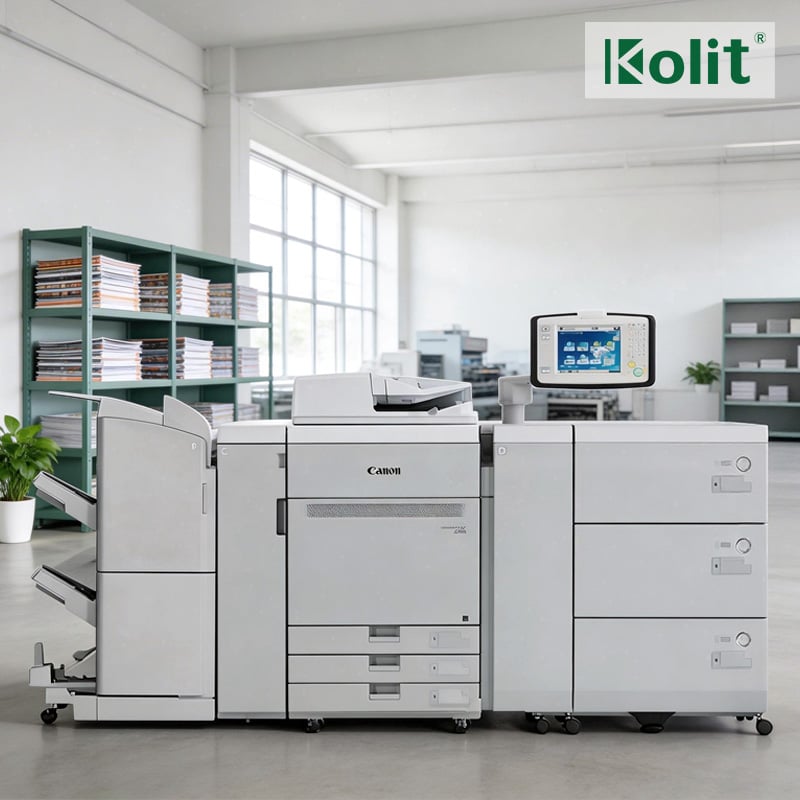
High-speed photocopier machines are particularly valuable in environments with heavy document volumes. A device capable of producing 75 to 85 pages per minute, such as the photocopier machines in the Canon C850 range, dramatically shortens queue times during peak hours. Faster throughput means employees spend less time waiting and more time completing their core responsibilities.
Reducing Manual Handling and Errors
Photocopier machines with automatic document feeders and duplex printing reduce the manual handling required to prepare business documents. Fewer manual steps translate directly into fewer errors, which is a key driver of office efficiency. When photocopier machines handle collating, stapling, and double-sided printing automatically, staff avoid repetitive tasks that consume valuable working hours. The result is a leaner, more accurate document production process that supports consistent output quality across the organization.
Cost Efficiency and Resource Management
Lowering Per-Page Operational Costs
Efficient photocopier machines directly reduce the cost per page, which is one of the most important metrics in office resource planning. High-volume photocopier machines spread consumable costs across a much larger number of prints, making each individual copy far more economical. Businesses that invest in capable photocopier machines rather than relying on desktop printers for bulk tasks often see significant reductions in monthly printing expenditure. Over a full fiscal year, those savings accumulate into meaningful budget relief that can be redirected toward other operational priorities.
Refurbished photocopier machines offer an especially cost-conscious path to high performance. A professionally serviced refurbished unit delivers comparable speed and output quality to a new machine at a substantially lower acquisition price. For budget-aware offices, refurbished photocopier machines provide a practical way to access enterprise-grade capabilities without stretching capital expenditure limits. The key is sourcing refurbished photocopier machines from reputable suppliers who certify component integrity and provide service support.
Consolidating Equipment and Reducing Downtime
Offices that rely on fragmented printing setups often experience more frequent downtime because multiple devices each carry their own failure risk. Consolidating operations around reliable photocopier machines reduces the number of potential failure points in the document workflow. Modern photocopier machines are engineered for high-duty cycles, meaning they can sustain heavy use without frequent breakdowns. This reliability is fundamental to office efficiency because every minute a document workflow is interrupted represents lost productivity across the team depending on that output.
Supporting Digital Transformation Through Photocopier Machines
Integrated Scanning and Digital Filing
Contemporary photocopier machines are not simply copy devices — they are active participants in digital transformation strategies. Many current photocopier machines can scan directly to cloud storage, email, or networked document management systems. This integration means that paper-based records are converted into searchable digital files quickly and accurately, reducing the need for manual data entry. Offices that leverage the scanning capabilities of their photocopier machines build a more agile document infrastructure that supports remote access, compliance archiving, and faster information retrieval.
High-resolution output from photocopier machines operating at 1200 DPI ensures that scanned documents retain sharp, readable detail even after digital compression. When photocopier machines produce crisp, accurate digital reproductions, the resulting files are more useful for professional applications such as contract archiving, regulatory reporting, and client communication. Precision in digital output reflects directly on the professional standards of the business using those photocopier machines.
Network Connectivity and Team-Wide Access
Network-connected photocopier machines give every employee across a department or floor shared access to centralized copying and printing capabilities. Rather than each workstation maintaining its own printer, a single set of well-placed photocopier machines serves an entire team simultaneously. This shared model reduces hardware maintenance, lowers consumable costs, and ensures consistent print quality standards. IT administrators also benefit because managing a small number of networked photocopier machines is far simpler than maintaining a sprawling inventory of individual desktop devices.
FAQ
How do photocopier machines improve daily office productivity?
Photocopier machines improve daily productivity by centralizing document tasks, reducing wait times, and automating repetitive processes such as collating and duplex printing. When photocopier machines handle high-volume tasks efficiently, employees focus on higher-value work rather than managing paper logistics.
Are refurbished photocopier machines reliable for business use?
Yes, refurbished photocopier machines sourced from certified suppliers are highly reliable for business use. Properly serviced photocopier machines undergo component testing and quality checks that restore them to consistent performance standards, making them a cost-effective and dependable choice for offices managing tight equipment budgets.
What features should offices prioritize when selecting photocopier machines?
Offices should prioritize speed, resolution, network connectivity, and duty cycle when evaluating photocopier machines. For environments with high document volumes, photocopier machines that combine fast output speeds with multifunction capabilities — including scanning and digital filing — deliver the strongest return on investment and the greatest overall contribution to office efficiency.