
 EN
EN



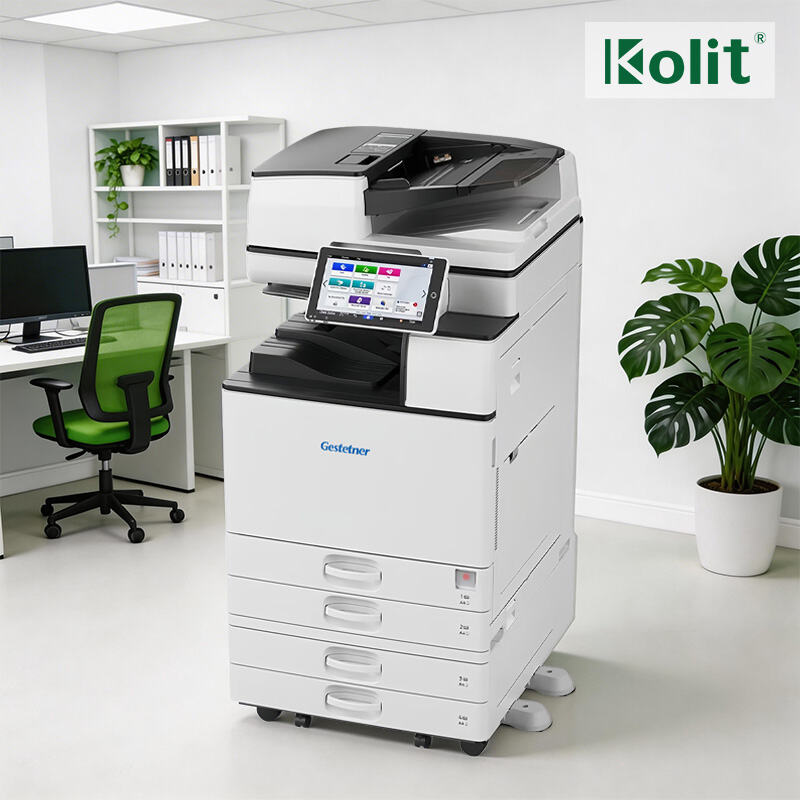
Define Your Business Needs: Purpose, Users, and Core Functions
Match printer and photocopier type to organizational context (SMB, corporate, education, government)
Selecting office equipment requires aligning capabilities with operational scale and environment. Small businesses benefit from compact multifunction printers handling moderate volumes (≤ 3,000 pages monthly), while corporate offices need robust systems supporting 50+ users and 20,000+ pages per month. Educational institutions prioritize durability—devices should withstand 500+ daily operations from student use. Government deployments require FIPS 140-2 validated encryption and built-in audit trails to meet compliance mandates. Physical constraints matter too: 30% of organizations report workflow bottlenecks after ignoring space limitations during procurement.
Identify essential functions: print, copy, scan, fax, finishing, and security requirements
Document workflows determine functional priorities. Retail operations rely heavily on receipt printing and inventory scanning; legal firms depend on notarized fax transmission and secure document shredding. Analyze volume: teams scanning 100+ pages daily need Automatic Document Feeders (ADF) with ≥80-sheet capacity. Finishing features—stapling, hole-punching, booklet-making—are essential for client-facing deliverables. For cybersecurity, enforce user authentication via PIN, badge, or biometric access—unsecured devices contribute to 43% of data breaches involving printed materials. Avoid over-provisioning: 55% of enterprises overspend on underused features, per 2023 workflow audits.
Size Up Capacity and Scalability: Volume, Layout, and Growth Readiness
Align device speed and duty cycle with daily/monthly print volume (low, medium, high)
Match speed and durability to your actual usage—not theoretical peaks. Low-volume environments (<1,000 pages/month) perform well with compact devices rated for ≤5,000 pages monthly. Medium-volume offices (1,000–5,000 pages/month) require machines rated for 10,000–30,000 pages/month and print speeds of 25–40 ppm. High-volume settings—like print centers or large legal departments exceeding 10,000 pages/month—demand 50+ ppm output and duty cycles above 50,000 pages/month. Crucially, verify the recommended monthly page volume—not just maximum duty cycle—to ensure sustained reliability during peak demand. Over-specifying inflates cost; under-specifying invites breakdowns and costly service calls.
Optimize deployment: number of devices, placement, and user accessibility by team size and office layout
Deployment strategy directly impacts productivity and user satisfaction. A single multifunction printer suffices for teams of 10–15 in centralized layouts. In multi-floor or distributed offices, place one device per floor—or every 15–20 workstations—to minimize walking time. Open-plan spaces benefit from two or three strategically located units to prevent bottlenecks; departmental setups often justify dedicated devices for sales, HR, and finance. Position units near high-traffic zones but away from quiet areas like meeting rooms or call centers. Allow adequate clearance for paper storage, service access, and ventilation. Plan ahead: choose network-ready models or budget for incremental expansion as headcount grows beyond 20—avoiding disruptive retrofits later.
Evaluate Technical Performance and Digital Workflow Integration
Key specs for reliability: ppm, dpi, paper handling (ADF, duplex), and connectivity (USB, Ethernet, Wi-Fi)
Reliability hinges on balanced technical specifications—not isolated benchmarks. Print speed (ppm) matters most when measured against real-world throughput; a 35 ppm device delivers tangible gains over 20 ppm in shared environments. Resolution (dpi) should support legible text and crisp graphics without unnecessary overhead—1,200 × 1,200 dpi meets most professional needs. Robust paper handling is non-negotiable: ADFs with ≥80-sheet capacity and standard duplexing cut paper use by 50% while reducing manual intervention. Connectivity must be flexible: Ethernet ensures stable network integration for shared access, Wi-Fi enables mobile and ad-hoc printing, and USB remains critical for direct, network-independent jobs.
Seamless digital workflows: mobile print, cloud scan, OCR, and secure authentication
Modern devices function as digital workflow hubs—not just output terminals. Mobile printing lets staff submit jobs from iOS and Android devices without installing drivers. Cloud scanning routes documents directly to SharePoint, OneDrive, Google Drive, or ECM platforms. Integrated Optical Character Recognition (OCR) converts scanned files into searchable, editable PDFs—eliminating manual rekeying. Secure authentication (PIN, smart card, or badge) enforces accountability and prevents unauthorized access to sensitive outputs. Together, these capabilities reduce friction between physical and digital information flows, shortening approval cycles and improving audit readiness.
Calculate True Value: TCO, Support, and Long-Term Service Assurance
Your printer and photocopier investment extends far beyond the sticker price. Total Cost of Ownership (TCO) reveals the full financial impact—including consumables, maintenance, energy use, and downtime costs—over the device’s typical 3–5 year lifespan. Industry analysis shows operational expenses often exceed initial purchase costs by 300% in unmanaged fleets.
Prioritize service agreements with enforceable response times to protect productivity. Comprehensive contracts typically reduce repair costs by 40% and extend hardware life through proactive maintenance. Ensure coverage includes:
- Next-business-day onsite repairs
- Remote diagnostics and troubleshooting
- Priority parts availability
- Automated consumables replenishment
For long-term assurance, insist on transparent Service Level Agreements (SLAs) with uptime guarantees of 99%+. Organizations with rigorously enforced SLAs report 67% fewer workflow interruptions, according to recent operational efficiency studies—delivering both budget predictability and measurable continuity.
Ready to Select the Perfect Printer & Photocopier for Your B2B Business?
Choosing the right printing equipment is a strategic B2B decision that impacts productivity, cost efficiency, and long-term scalability. Aligning device type, capacity, technical specs, and service support with your unique business needs ensures maximum ROI and seamless daily operations.
For tailored B2B printer and photocopier solutions—including brand-new, remanufactured, and OEM-customized devices from Ricoh, Canon, Xerox, and Konica Minolta, plus flexible leasing plans and 99% uptime SLAs—partner with Kolit. With 30+ years of printing industry expertise, 15 global branches, and a team of certified engineers, we deliver end-to-end procurement, deployment, and maintenance support for SMBs, enterprises, and OEM partners worldwide. Contact us today for a no-obligation consultation to design your ideal print/copy solution.
FAQ
What type of printer should a small business choose?
Small businesses should opt for compact multifunction printers designed for moderate volumes of up to 3,000 pages per month. These models are cost-effective and space-efficient.
What features are essential for high-volume environments?
High-volume setups require printers with speeds of 50+ ppm, a duty cycle above 50,000 pages per month, and robust paper handling, such as ADF with ≥80-sheet capacity.
How should printers be deployed in an office layout?
In centralized layouts, one multipurpose printer can serve 10–15 users. For distributed layouts, place devices strategically—one for every 15–20 workstations or per floor—to minimize workflow bottlenecks.
What is Total Cost of Ownership (TCO), and why is it important?
TCO encompasses all costs associated with a printer, including consumables, maintenance, energy use, and downtime. It helps businesses understand the long-term financial impact and plan budgets effectively.
What are SLAs, and why are they crucial for printers?
Service Level Agreements (SLAs) are contracts ensuring service reliability, uptime guarantees, and quick repairs. Enforced SLAs reduce workflow interruptions and enhance productivity in the long term.